Translate

Sunday, May 26, 2013

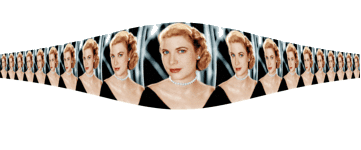
Creating Floral Shape


1. Upload any background you like to imagemagick

2. Go to resize and get the size of your image. The size of my image is 320 x240

3. F/X-distort- distort type: arc

Virtual Pixel Method: tile

4. Parameter 90,0, 160, -240 (90,0 half the width, and negative of length of your image. Press 


effect. You  can press effect as many times as you want to achieve the best result.

Sample:


Animated Sample:


Sunday, May 19, 2013

Etched Font


Make a white background of any size you like

Annotate: Anything you like

Change font type, color and size.

I prefer gray as stroke color

And white as fill color

Effect-blur: (0.0x2 )

Annotate again without changing anything

Effect-> shade: 30x145

You may play with these numbers to achieve the best effect

Sample:

Creating Chocolate Bar


Make a chocolate  background at imagemagick
Just type in chocolate in the meta slot
Use 120x120 in the size slot
Now go to decorate
Delete the exsiting parameter
And type in 10x10+5+5
Color: #3E2C22 or #3F2528
Click on frame and press decorate.
Resize: half size
Output as gif/png
 Example of single bar:


Save it for a while.

Go back to resize again
Click on the double size button twice so that your new size is 280x280
Upload the small bar you created
Compose it over
Make sure to click on ‘tile across and down the canvas’ button
Your chocolate bar is ready
Save it as jpeg/gif/png.  


Final Image: 


More sample:


Saturday, May 18, 2013

SRT Effect


Take an image to studio

F/X: 1,1,.5,0

Distort

Distort type: SRT


Virtual Pixel Method: tile

The trick is in the decimal number

The more you will increase the more tile effect you will get.


Save the final image as png.

You can proceed further by decorating with gray or black frame then repeat the above 


procedure.

Or you can change the Virtual Pixel Method to checker tile or mirror. The choice is absolutely 

yours. Play with all options to create something unique. 

Sample:


checker tile 
VPM: Mirror


Barrel Effect 2


Take an image
F/X: 0,6,0,0
Distort
Distort type: barrel

Virtual Pixel Method: checker tile
Save as png

Barrel Effect


Take an image to imagemagick

F/X: 6,6,3,4

Distort

Distort type: barrel


Virtual Pixel Method: horizontal tile

Press effect.

Matte out with


Fuzz: 9000 

Method:Floodfill

Fillcolor-none

Color:none

Save as png


More sample:

Shepard Effect


Take the image to imagemagick 


F/X-Distort: 0,0,90,0 (change the third number according to your picture's dimension)

Shepard

Virtual Pixel Method : checker tile

Annotate

Vertically

M

O

N

A

L

I

S

A

Offset:+40+50, gravity northwest;fillcolor: #8B6508

Final Image